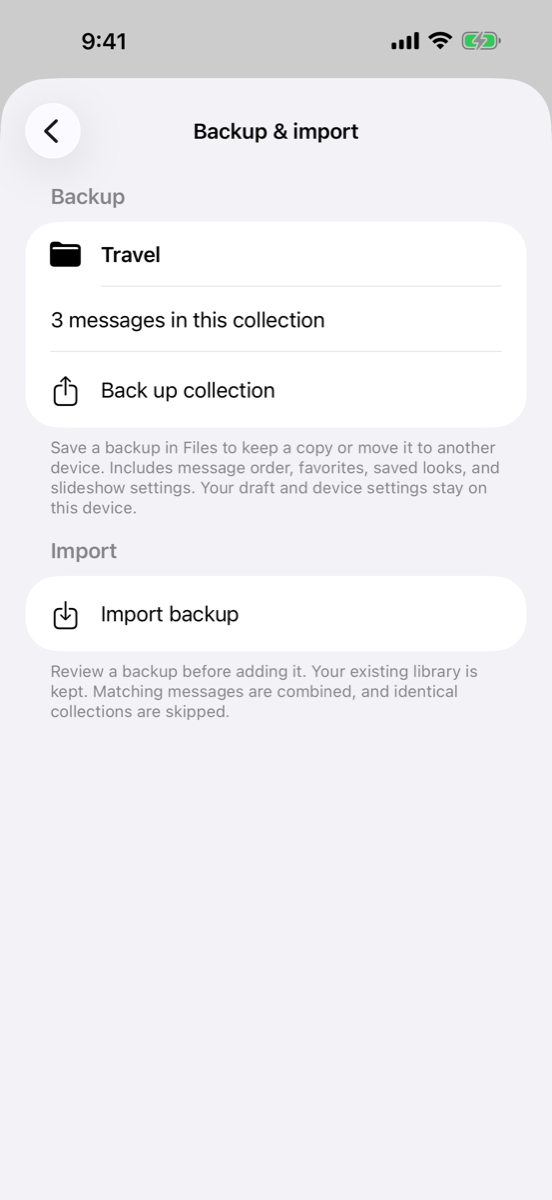
Backup and Import
Save portable backups, move collections between devices, review imports, and resolve saved-look conflicts.
Save a backup
Open Backup & import from Settings or Messages → Collections. Choose Back up library and save the file in Files. To export just one collection, open it and choose Back up collection.
The .bigbackup file includes messages, favorites, use counts, last-used dates, saved looks, collection order and membership, and slideshow settings. Your current draft, device preferences, and named custom-theme list are not included. Message looks carry their actual colors and lettering.
Move to another device
- Save the backup to iCloud Drive, AirDrop it through Files, or use another transfer method you choose.
- On the other device, choose Import backup and select the file. Opening the
.bigbackupfile can also take you to import review. - Review the counts and look choices.
- Tap Import backup to merge it into the existing library, or Cancel to leave the library unchanged.
Matching messages and looks
Matching text combines into the existing message identity. Favorites are kept from either copy. Use counts and last-used dates use the higher value, rather than adding counts again on every import.
If matching messages have different looks, choose Keep current looks or Use backup looks in the review. Existing library content is kept. Identical named collections are skipped; conflicting collection names get an imported suffix. Reimporting the same file avoids duplicates.
A file will not import
The app validates the complete file before changing the library. It rejects damaged or unsupported files, missing message references, and files over 10 MB. A backup from a future app version may require updating the receiving app. Try exporting individual collections if a library backup is too large.